
diff options
| author | navewindre <boneyaard@gmail.com> | 2025-04-05 02:59:37 +0200 |
|---|---|---|
| committer | navewindre <boneyaard@gmail.com> | 2025-04-05 02:59:37 +0200 |
| commit | b24463f3d045783b8f4e72926054d53b908e150f (patch) | |
| tree | 036f976e217128b9e4acf3854f72908c27dec17b /config/mpv/scripts/subs2srsa/README.md | |
| parent | 398e41be4daf339bd55862520c528a7d93b83fb6 (diff) | |
a
Diffstat (limited to 'config/mpv/scripts/subs2srsa/README.md')
| -rw-r--r-- | config/mpv/scripts/subs2srsa/README.md | 478 |
1 files changed, 478 insertions, 0 deletions
diff --git a/config/mpv/scripts/subs2srsa/README.md b/config/mpv/scripts/subs2srsa/README.md new file mode 100644 index 0000000..deefe3c --- /dev/null +++ b/config/mpv/scripts/subs2srsa/README.md @@ -0,0 +1,478 @@ +<p align="center"> +<img src="https://user-images.githubusercontent.com/69171671/117440218-4ae26800-af23-11eb-87b4-1d9026fc953f.png"/> +</p> + +# mpvacious + +[](https://aur.archlinux.org/packages/mpv-mpvacious/) +[](https://tatsumoto-ren.github.io/blog/join-our-community.html) + +[](https://tatsumoto.neocities.org/blog/donating-to-tatsumoto.html) + +mpvacious is your semi-automatic subs2srs for mpv. +It supports multiple workflows and allows you to quickly create Anki cards +while watching your favorite TV show. +**[Video demonstration](https://redirect.invidious.io/watch?v=vU85ramvyo4)**. + +## Requirements + +<table> +<tr> + <th><a href="https://www.gnu.org/gnu/about-gnu.html">GNU/Linux</a></th> + <th><a href="https://www.gnu.org/proprietary/malware-microsoft.en.html">Windows 10+</a></th> + <th><a href="https://www.gnu.org/proprietary/malware-apple.en.html">macOS</a></th> + <th>Comments</th> +</tr> +<tr> + <td><a href="https://wiki.archlinux.org/index.php/Mpv">mpv</a></td> + <td><a href="https://sourceforge.net/projects/mpv-player-windows/files">mpv</a></td> + <td><a href="https://mpv.io/installation/">mpv</a></td> + <td>v0.32.0 or newer.</td> +</tr> +<tr> + <td><a href="https://wiki.archlinux.org/index.php/Anki">Anki</a></td> + <td colspan="2" align="center"><a href="https://apps.ankiweb.net/">Anki</a></td> + <td></td> +</tr> +<tr> + <td colspan="3" align="center"><a href="https://ankiweb.net/shared/info/2055492159">AnkiConnect</a></td> + <td>Install from AnkiWeb.</td> +</tr> +<tr> + <td><a href="https://www.archlinux.org/packages/core/x86_64/curl/">curl</a></td> + <td colspan="2" align="center"><a href="https://curl.haxx.se/">curl</a></td> + <td>Installed by default on all platforms except Windows 7.</td> +</tr> +<tr> + <td><a href="https://www.archlinux.org/packages/extra/x86_64/xclip/">xclip</a> or <a href="https://archlinux.org/packages/extra/x86_64/wl-clipboard">wl-copy</a></td> + <td></td> + <td>pbcopy</td> + <td>To copy subtitle text to clipboard.</td> +</tr> +</table> + +Install all dependencies at once (on [Arch-based](https://www.parabola.nu/) +[distros](https://www.gnu.org/distros/free-distros.en.html)): + +``` +$ sudo pacman -Syu mpv anki curl xclip --needed +``` + +## Prerequisites + +* A guide on how to set up Anki can be found [on our site](https://tatsumoto.neocities.org/blog/setting-up-anki.html). +* If you're on a [Windows](https://www.fsf.org/windows) or a [Windows-like](https://reactos.org/) machine, + a mpv build by `shinchiro` is recommended. +* **macOS** users are advised to use [homebrew](https://brew.sh/) or manually add `mpv` to `PATH`. +* Note that it is not recommended to use FlatPak or similar containers. + If you still want to, [read this](howto/flatpak.md). +* Make sure that your build of mpv supports encoding of audio and images. + This shell command can be used to test it. + + ``` + $ mpv 'test_video.mkv' --loop-file=no --frames=1 -o='test_image.jpg' + ``` + + If the command fails, find a compatible build on the [mpv website](https://mpv.io/installation/) + or instead install FFmpeg and [enable FFmpeg support](#configuration) in `mpvacious`'s config file. +* Most problems with adding audio or images to Anki cards can be fixed + by installing FFmpeg and enabling it settings. + +## Installation + +There are multiple ways you can install `mpvacious`. +I recommend installing with `git` so that you can easily update on demand. + +`mpvacious` is a user-script for mpv, +so it has to be installed in the directory `mpv` reads its user-scripts from. + +| OS | Location | +|-----------|--------------------------------------------------| +| GNU/Linux | `~/.config/mpv/scripts/` | +| Windows | `C:/Users/Username/AppData/Roaming/mpv/scripts/` | + +Windows is not recommended, +but we acknowledge that some people haven't switched to GNU/Linux yet. + +### Using git + +Clone the repo to the `scripts` directory. + +``` +mkdir -p ~/.config/mpv/scripts/ +git clone 'https://github.com/Ajatt-Tools/mpvacious.git' ~/.config/mpv/scripts/subs2srs +``` + +To update, run the following command. + +``` +cd ~/.config/mpv/scripts/subs2srs && git pull +``` + +### From the AUR + +`mpvacious` can be installed with the [mpv-mpvacious](https://aur.archlinux.org/packages/mpv-mpvacious/) package. + +### Manually + +This way is not recommended because it's easy to make a mistake during the process +and end up with a broken install. + +Download +[the repository](https://github.com/Ajatt-Tools/mpvacious/archive/refs/heads/master.zip) +or +[the latest release](https://github.com/Ajatt-Tools/mpvacious/releases) +and extract the folder containing +[subs2srs.lua](https://raw.githubusercontent.com/Ajatt-Tools/mpvacious/master/subs2srs.lua) +to your [mpv scripts](https://github.com/mpv-player/mpv/wiki/User-Scripts) directory. + +<details> + +<summary>Expected directory tree</summary> + +``` +~/.config/mpv/scripts +|-- other script 1 +|-- other script 2 +|-- subs2srs +| |-- main.lua +| |-- subs2srs.lua +| `-- other files +`-- other script 3 +``` + +</details> + +<details> + +<summary>A note for mpv v0.32 and older</summary> + +Older versions of `mpv` don't know how to handle user-scripts in subdirectories. +You need to tell mpv where to look for `mpvacious`. + +Open or create `~/.config/mpv/scripts/modules.lua` and add these lines: +``` +local mpv_scripts_dir_path = os.getenv("HOME") .. "/.config/mpv/scripts/" +package.path = package.path .. ';' .. os.getenv("HOME") .. '/.config/mpv/scripts/subs2srs/?.lua' +function load(relative_path) dofile(mpv_scripts_dir_path .. relative_path) end +load("subs2srs/subs2srs.lua") +``` + +</details> + +**Note:** in [Celluloid](https://www.archlinux.org/packages/community/x86_64/celluloid/) +user scripts are installed in `/.config/celluloid/scripts/`. +When following the instructions above, replace `.config/mpv` with `.config/celluloid` +and optionally `subs2srs` with the name of the folder mpvacious is cloned into. + +## Configuration + +The config file should be created by the user, if needed. + +| OS | Config location | +|--------------------|-------------------------------------------------------------------| +| GNU/Linux | `~/.config/mpv/script-opts/subs2srs.conf` | +| Windows | `C:/Users/Username/AppData/Roaming/mpv/script-opts/subs2srs.conf` | +| Windows (portable) | `mpv.exeフォルダ/portable_config/script-opts/subs2srs.conf` | + +If a parameter is not specified +in the config file, the default value will be used. +mpv doesn't tolerate spaces before and after `=`. + +<p align="center"> + <a href="https://github.com/Ajatt-Tools/mpvacious/blob/master/.github/RELEASE/subs2srs.conf">Example configuration file</a> +</p> + +If the first field is empty, it will be set contain the string `[empty]`. +Otherwise, Anki won't allow mpvacious to add new notes. +This won't happen if the sentence field is first in the note type settings. + +**Tip**: Try [our official note type](https://ankiweb.net/shared/info/1557722832) +if you don't want to configure note fields yourself. +Alternatively, we have a collection of user-created note types, which you can browse +[here](https://github.com/Ajatt-Tools/AnkiNoteTypes). + +If you are having problems playing media files on older mobile devices, +set `audio_format` to `mp3` and/or `snapshot_format` to `jpg`. +Otherwise, I recommend sticking with `opus` for audio, +and `avif` or `webp` for images, +as they greatly reduce the size of the generated files. + +If you still use AnkiMobile (the [proprietary](https://www.gnu.org/proprietary/) Anki app), +set `opus_container` to `m4a` or `webm`. I'll allow iOS to play Opus files, while still maintaining +compatibility with non-Apple devices. For really old iOS devices, set `opus_container` to +[`caf`](https://en.wikipedia.org/wiki/Core_Audio_Format). CAF plays only on Anki Desktop, +AnkiWeb in Safari and AnkiMobile, and is really not recommended. (Please note that +[Lockdown Mode](https://support.apple.com/en-us/105120) completely disables Opus and AVIF support, +though you may try to add an exception for AnkiMobile.) + +If no matter what mpvacious fails to create audio clips and/or snapshots, +change `use_ffmpeg` to `yes`. +By using ffmpeg instead of the encoder built in mpv you can work around most encoder issues. +You need to have ffmpeg installed for this to work. + +### Key bindings + +The user may change some global key bindings, though this step is not necessary. +See [Usage](#usage) for the explanation of what they do. + +| OS | Config location | +|-----------|----------------------------------------------------| +| GNU/Linux | `~/.config/mpv/input.conf` | +| Windows | `C:/Users/Username/AppData/Roaming/mpv/input.conf` | + +Default bindings: + +``` +a script-binding mpvacious-menu-open + +Ctrl+g script-binding mpvacious-animated-snapshot-toggle + +Ctrl+n script-binding mpvacious-export-note + +Ctrl+m script-binding mpvacious-update-last-note +Ctrl+M script-binding mpvacious-overwrite-last-note + +g script-binding mpvacious-quick-card-menu-open +Alt+g script-binding mpvacious-quick-card-sel-menu-open + +Ctrl+c script-binding mpvacious-copy-primary-sub-to-clipboard +Ctrl+C script-binding mpvacious-copy-secondary-sub-to-clipboard +Ctrl+t script-binding mpvacious-autocopy-toggle + +H script-binding mpvacious-sub-seek-back +L script-binding mpvacious-sub-seek-forward + +Alt+h script-binding mpvacious-sub-seek-back-pause +Alt+l script-binding mpvacious-sub-seek-forward-pause + +Ctrl+h script-binding mpvacious-sub-rewind +Ctrl+H script-binding mpvacious-sub-replay +Ctrl+L script-binding mpvacious-sub-play-up-to-next + +Ctrl+v script-binding mpvacious-secondary-sid-toggle +Ctrl+k script-binding mpvacious-secondary-sid-prev +Ctrl+j script-binding mpvacious-secondary-sid-next +``` + +**Note:** A capital letter means that you need to press Shift in order to activate the corresponding binding. +For example, <kbd>Ctrl+M</kbd> actually means <kbd>Ctrl+Shift+m</kbd>. +mpv accepts both variants in `input.conf`. + +## Usage + +* [Create a card](howto/create_card.md) +* [Quick card creation](howto/create_quick_card.md) +* [Open the "Add" dialog](howto/add_dialog.md) +* [Usage with Rikaitan](howto/yomichan.md) +* [Usage with GoldenDict](howto/goldendict.md) + +### Global bindings + +**Menu:** + +* <kbd>a</kbd> - Open `advanced menu`. + +**Enable\Disable animation:** + +* <kbd>Ctrl+g</kbd> - If animation is enabled, animated snapshots will be generated instead of static images. + Animated snapshot are like GIFs (just in a different format) + and will capture the video from the start to the end times selected. + +**Make a card:** + +* <kbd>Ctrl+n</kbd> - Export a card with the currently visible subtitle line on the front. +Use this when your subs are well-timed, +and the target sentence doesn't span multiple subs. + +**Quick card creation:** + +* <kbd>g</kbd> - Quick card creation menu. +* <kbd>Alt+g</kbd> - Quick card creation, card selection menu. + +**Update the last card:** + +* <kbd>Ctrl+m</kbd> - Append to the media fields of the newly added Anki card. +* <kbd>Ctrl+Shift+m</kbd> - Overwrite media fields of the newly added Anki card. + +**Clipboard:** + +* <kbd>Ctrl+c</kbd> - Copy current subtitle string to the system clipboard. +* <kbd>Ctrl+t</kbd> - Toggle automatic copying of subtitles to the clipboard. + +**Seeking:** + +* <kbd>Shift+h</kbd> and <kbd>Shift+l</kbd> - Seek to the previous or the next subtitle. +* <kbd>Alt+h</kbd> and <kbd>Alt+l</kbd> - Seek to the previous, or the next subtitle, and pause. +* <kbd>Ctrl+h</kbd> - Seek to the start of the currently visible subtitle. Use it if you missed something. +* <kbd>Ctrl+Shift+h</kbd> - Replay current subtitle line, and pause. +* <kbd>Ctrl+Shift+l</kbd> - Play until the end of the next subtitle, and pause. Useful for beginners who need + to look up words in each and every dialogue line. + +**Secondary subtitles:** + +* <kbd>Ctrl+v</kbd> - Toggle visibility. +* <kbd>Ctrl+k</kbd> - Switch to the previous subtitle if it's not already selected. +* <kbd>Ctrl+j</kbd> - Switch to the next subtitle if it's not already selected. + +### Menu options + +Advanced menu has the following options: + +* <kbd>f</kbd> - Increment number of cards to update. Only affects note updating, including quick card creation. The number of cards to update is reset to 1 upon updating a note. +* <kbd>shift+f</kbd> - Decrement number of cards to update. + +* <kbd>c</kbd> - Interactive subtitle selection. + The range of the currently displayed subtitle line is selected. The selection then grows both ways based on the following displayed lines. + It does nothing if there are no subs on screen. + +* <kbd>shift+s</kbd> - Set the start time to the current sub. The selection then grows forward based on the following displayed lines. + The default selection spans across the range of the currently displayed subtitle line. +* <kbd>shift+e</kbd> - Set the end time to the current sub. The selection then grows backward based on the following displayed lines. + The default selection spans across the range of the currently displayed subtitle line. + +Then seek with <kbd>Shift+h</kbd> and <kbd>Shift+l</kbd> to the previous/next line that you want to add. +Press <kbd>n</kbd> to make the card. + +* <kbd>r</kbd> - Forget all previously saved timings and associated dialogs. + +* <kbd>z</kbd> and <kbd>Shift+z</kbd> - Adjust subtitle delay. + +If above fails, you have to manually set timings. +* <kbd>s</kbd> - Set the start time. The selection then grows forward based on the following displayed lines. +The default selection spans across the selected start point and the end of the subtitle line. +* <kbd>e</kbd> - Set the end time. The selection then grows backward based on the following displayed lines. +The default selection spans across the selected end point and the start of the subtitle line. + +Then, as earlier, press <kbd>n</kbd> to make the card. + +**Tip**: change playback speed by pressing <kbd>[</kbd> and <kbd>]</kbd> +to precisely mark start and end of the phrase. + +### My subtitles are not in sync + +If subs are badly timed, first, you could try to re-time them. +Read [Retiming subtitles](https://tatsumoto.neocities.org/blog/retiming-subtitles). +Or shift timings using key bindings provided by mpv (usually <kbd>z</kbd> and <kbd>Shift+z</kbd>). + +### Example sentence card + +With the addon you can make cards like this in just a few seconds. + +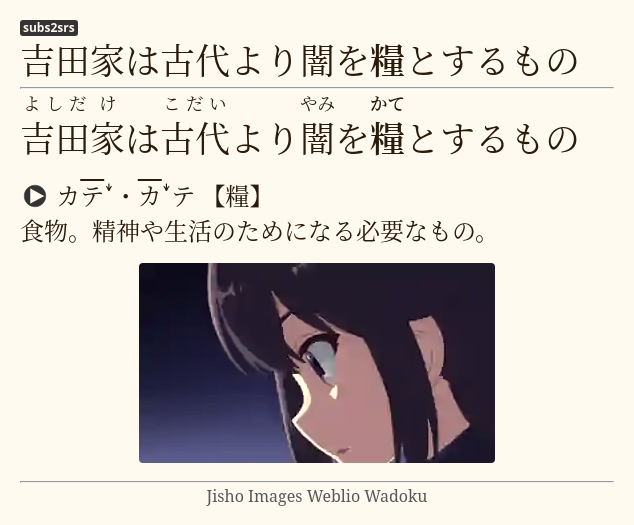 + +### Audio cards + +It is possible to make a card with just audio, and a picture +when subtitles for the show you are watching aren't available, for example. +mpv by default allows you to do a `1` second exact seek by pressing <kbd>Shift+LEFT</kbd> and <kbd>Shift+RIGHT</kbd>. +Open the mpvacious menu by pressing <kbd>a</kbd>, seek to the position you need, and set the timings. +Then press <kbd>g</kbd> to invoke the `Add Cards` dialog. +Here's a [video demonstration](https://redirect.invidious.io/watch?v=BXhyckdHPGE). + +If the show is hard-subbed, you can use +[transformers-ocr](https://tatsumoto.neocities.org/blog/mining-from-manga.html) +to recognize and add text to the card. + +### Secondary subtitles + +If you want to add a translation to your cards, and you have the subtitles in that language, +you can add them as secondary subtitles if you run `mpv` with `--secondary-sid=<sid>` parameter, +`sid` being the track identifier for the subtitle. + +You also need to specify `secondary_field` in the [config file](#Configuration) +if it is different from the default. + +If you want to load secondary subtitles **automatically**, don't modify the run parameters +and instead set the desired languages in the config file (`secondary_sub_lang` option). + +Secondary subtitles will be visible when hovering over the top part of the `mpv` window. + +https://user-images.githubusercontent.com/69171671/188492261-909ba3e8-b82c-493f-88cf-0ec953dfcfe1.mp4 + +By pressing <kbd>Ctrl</kbd>+<kbd>v</kbd> you can control secondary sid visibility without using the mouse. + +### Other tools + +If you don't like the default Rikaitan Search tool, try: + +* Clipboard Inserter browser add-on +([chrome](https://chrome.google.com/webstore/detail/clipboard-inserter/deahejllghicakhplliloeheabddjajm)) +([firefox](https://addons.mozilla.org/ja/firefox/addon/clipboard-inserter/)) +* A html page ([1](https://pastebin.com/zDY6s3NK)) ([2](https://pastebin.com/hZ4sawL4)) +to paste the contents of your clipboard to + +You can use any html page as long as it has \<body\>\</body\> in it. + +### Additional mpv key bindings + +I recommend adding these lines to your [input.conf](#key-bindings) for smoother experience. +``` +# vim-like seeking +l seek 5 +h seek -5 +j seek -60 +k seek 60 + +# Cycle between subtitle files +K cycle sub +J cycle sub down + +# Add/subtract 50 ms delay from subs +Z add sub-delay +0.05 +z add sub-delay -0.05 + +# Adjust timing to previous/next subtitle +X sub-step 1 +x sub-step -1 +``` + +## Profiles + +Mpvacious supports config profiles. +To make use of them, create a new config file called `subs2srs_profiles.conf` +in the same folder as your [subs2srs.conf](#Configuration). +Inside the file, define available profile names (without `.conf`) and the name of the active profile: + +``` +profiles=subs2srs,english,german +active=subs2srs +``` + +In the example above, I have three profiles. +The first one is the default, +the second one is for learning English, +the third one is for learning German. + +Then in the same folder create config files for each of the defined profiles. +For example, below is the contents of my `english.conf` file: + +``` +deck_name=English sentence mining +model_name=General +sentence_field=Question +audio_field=Audio +image_field=Extra +``` + +You don't have to redefine all settings in the new profile. +Specify only the ones you want to be different from the default. + +To cycle profiles, open the advanced menu by pressing <kbd>a</kbd> and then press <kbd>p</kbd>. +At any time you can see what profile is active in the menu's status bar. + +## Hacking + +If you want to modify this script +or make an entirely new one from scratch, +these links may help. + +* https://mpv.io/manual/master/#lua-scripting +* https://github.com/mpv-player/mpv/blob/master/player/lua/defaults.lua +* https://github.com/SenneH/mpv2anki +* https://github.com/kelciour/mpv-scripts/blob/master/subs2srs.lua +* https://pastebin.com/M2gBksHT +* https://pastebin.com/NBudhMUk +* https://pastebin.com/W5YV1A9q +* https://github.com/ayuryshev/subs2srs +* https://github.com/erjiang/subs2srs |